
What you will learn
On this pageContentsCloseOpen
A shop pays rent on a street where a bottle of olive oil sells for $28. The same bottle online, shipped, competes with a marketplace listing at $19. The merchant wants one product, one SKU, one inventory count — and two prices.
Shopify has an answer for this now. It just isn't the one that arrived in June.
The short version
What changed. The Shopify changelog entry dated June 17, 2026 says: "Channels are now available as a market type in Shopify Markets... Channel Markets are now available to all merchants using Markets." The Markets plan table shows Create channel markets and Customize product catalogs with a checkmark on Starter and Basic, Grow, Advanced, and Plus.
What didn't. Shopify POS is not a sales channel for this purpose. In-store pricing runs through Retail markets, and the Retail markets page opens with a plan requirement: "Customizing catalogs to use with Retail markets requires that your store uses POS Pro or for your store to be on the Shopify Plus plan."
What that costs. Shopify's own guide to POS costs lists POS Pro at "$89/month per retail location," and works the arithmetic out loud: "A two-location retailer pays $178/month in POS Pro fees on top of their base subscription; five locations, $445/month."
The fallback. Two App Store listings sell POS-versus-online pricing for $9.99 to $19.99 a month. Both declare access to Cart transforms, and Shopify's Cart Transform Function API reference states that only development stores and Plus stores can use apps with lineUpdate operations, that POS support is "Partially supported," and that order edits are not supported at all.
What channel markets actually unlocked
A channel market takes a sales channel as its condition instead of a country. You assign it a catalog, and that catalog can carry its own prices, its own product list, and its own currency. Shopify's example in the Sales channels and Markets article is TikTok Shop priced upward "to account for TikTok's selling fees that you pay."
That is a genuinely useful thing that used to require duplicate products or a connector app's markup field. But three constraints sit on it, and none of them appear in the changelog entry.
Ad channels can't have their own price. Shopify splits channels into two groups. Traffic-generating channels — Google, Meta — send the shopper to your online store to buy, so the Help Center is explicit: "the products must be published to your online store and they need to have the same pricing as your online store. If you try to apply custom catalog pricing to a market for a traffic-generating channel, then a warning message is displayed." Only order-generating channels, where the purchase completes on the third-party platform, get independent pricing.
Catalogs add, they don't subtract. "Adding a catalog to a channel market doesn't replace or exclude the country or region market's products. To restrict which products appear in the channel, adjust the parent market's catalog." A merchant who assigns a five-product catalog to a channel market expecting five products in the channel will get five products plus the entire parent market catalog.
Agentic storefronts are excluded. The same page states that agentic storefront sales channels can't be added to channel markets — which matters more each quarter as AI-assistant traffic grows.
POS is a different market type, with a different bill
The question in the Shopify Community threads is almost always in-store versus online, not TikTok versus online. That path runs through Retail markets, and the plan gate is real.
With POS Pro, the Retail markets overview says you "can set different pricing for Shopify POS and for your online store in the same region," and can price flagship, outlet, and pop-up locations differently from each other.
With the in-person selling features included in every paid plan — POS Lite — the same page is unusually direct:
Locations that are on Shopify POS Lite use Region markets only.
You can't apply different market settings to retail and online customers within the same region. Region markets apply in the same way to your online store and to retail locations in that region.
You can't create separate groups of retail locations in one region that each have different market configurations.
So it isn't that in-store pricing is awkward without POS Pro. It is that a US retail location and the US online store are the same market, by definition, and share one catalog.
Two smaller items from the same page are worth carrying into a rollout plan. Retail markets require Shopify POS app version 10.3.0 or higher. And company-specific B2B prices don't reach the register: "If a customer has access to B2B pricing for a company location, then they can't access those prices through Shopify POS, and need to purchase from your online store instead."
The workaround that also costs $89
A frequently suggested workaround is to skip catalogs and run an automatic discount at the register instead. Shopify's POS subscription comparison table puts a cross next to Automatic discounts for the included in-person features and a checkmark next to POS Pro. Manual discounts and discount codes are available on both, but they require a staff action on every sale.
Custom sales — typing a price into a blank line item — is available on both tiers. It is also how you lose your product-level reporting.
The one path that skips the fee is duplicating the product with a POS-only listing, which splits the inventory record. Both app vendors below name that specific problem in their marketing copy, which is a fair signal of what merchants tried first.
The app route, and what the function docs say about it
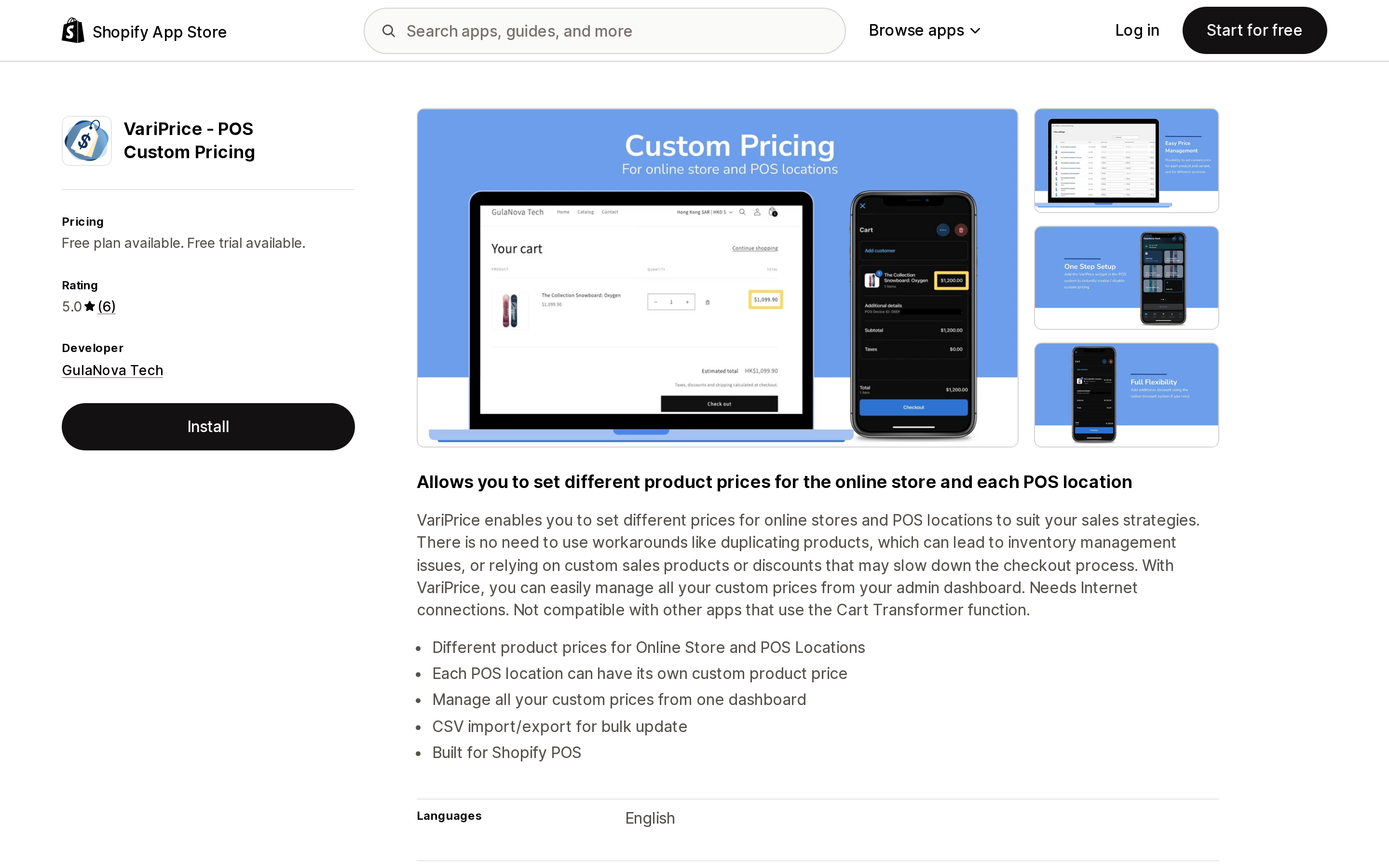
VariPrice ‑ POS Custom Pricing
Source: Shopify App Store (VariPrice ‑ POS Custom Pricing), retrieved September 7, 2026
VariPrice ‑ POS Custom Pricing from GulaNova Tech sets a price per product per POS location, managed from the admin with CSV import and export. It launched August 19, 2024 and showed 5.0 from 6 reviews on September 7, 2026.
Source: Shopify App Store (VariPrice ‑ POS Custom Pricing), retrieved September 7, 2026
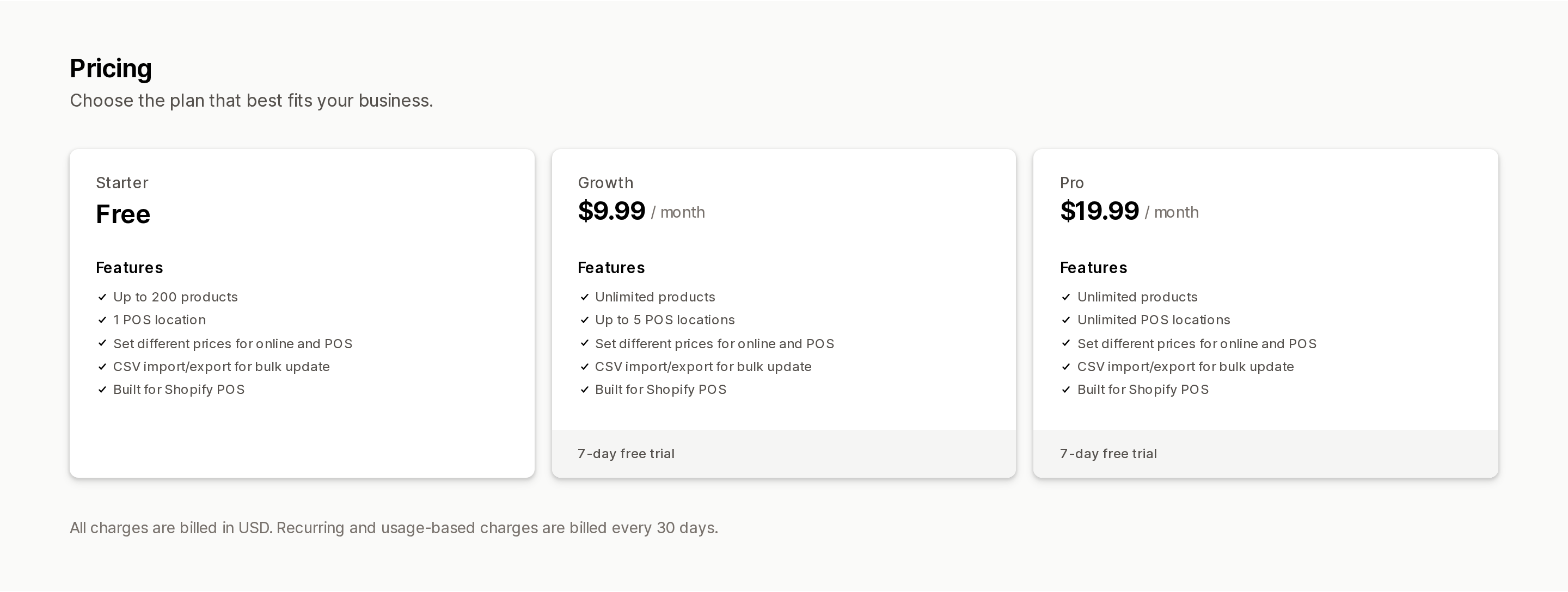
The free Starter plan covers up to 200 products and 1 POS location. Growth at $9.99/month lifts the product cap and allows up to 5 POS locations. Pro at $19.99/month removes the location cap. Paid plans carry a 7-day free trial.
Two lines in its own description do more work than the feature list: "Needs Internet connections. Not compatible with other apps that use the Cart Transformer function."
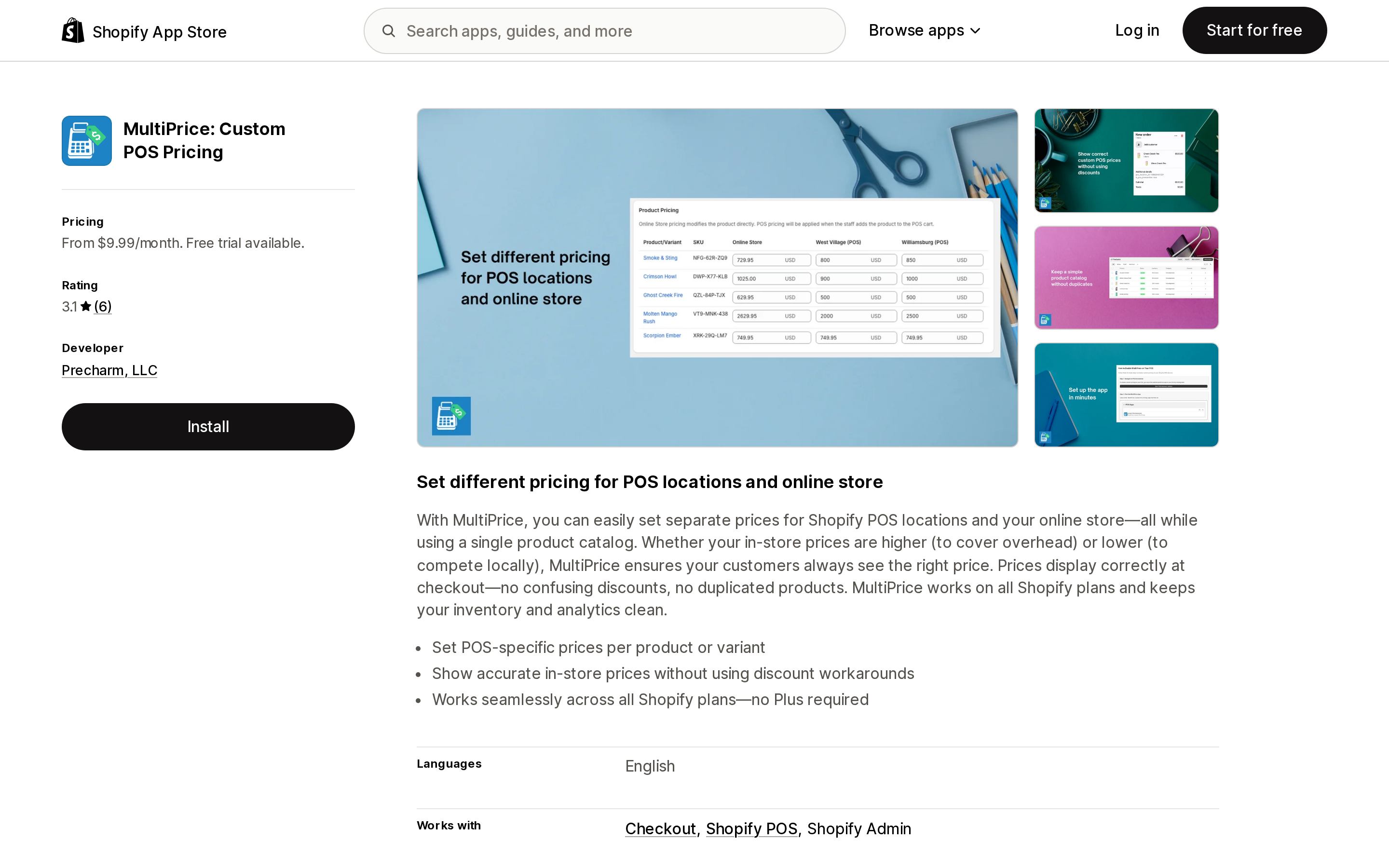
MultiPrice: Custom POS Pricing
Source: Shopify App Store (MultiPrice: Custom POS Pricing), retrieved September 7, 2026
MultiPrice: Custom POS Pricing from Precharm, LLC launched June 18, 2025 and showed 3.1 from 6 reviews on September 7, 2026. Its Business plan is $9.99/month, described as "For all Shopify merchants," with unlimited products and unlimited POS locations. Pro at $19.99/month is described as "For Shopify Plus merchants" and adds "Plus-optimized line-item display in POS." Both paid plans have a 7-day free trial.
The listing's recent reviews are not about pricing logic. A US merchant wrote on June 3, 2026 that POS "kept saying failed to load" and support did not answer; an Italian merchant wrote on August 7, 2026 about VAT not appearing on receipts after a Shopify update. Six reviews is a small sample, and two of them describe unanswered support.
Neither listing displays the Built for Shopify badge, checked September 7, 2026.
What both apps are actually doing
Both listings request Edit Shopify Functions: Cart transforms in their data access section. That places them under the Cart Transform Function API, and its documented limits transfer straight to your store:
- They can collide. "You can install a maximum of one cart transform function per app on each store. If a store has cart transform functions from more than one app, all of them run." The same reference lists bundling — expanding a cart line into its components, merging lines into a bundle — as the API's primary use cases, so a bundle app is the most likely thing already occupying that slot in your store. VariPrice states the conflict outright.
- The direct price-override operation is Plus-only. The reference carries the note "Only development stores or stores on a Shopify Plus plan can use apps with
lineUpdateoperations," and the same restriction onupdateoperations. Both apps advertise support on every plan, so on a non-Plus store the price change is arriving by some other operation — worth confirming with each vendor before you commit a season's pricing to it. - POS is "Partially supported." The compatibility list qualifies POS with: "
ProductVariant.requiresComponentsboolean has to betruefor complete cartTransform support on POS." - Order edits don't inherit it. Order Edit is listed as not supported in both the admin and checkout. So is the Create Order API, so are subscriptions, and so are pre-orders and Try Before You Buy.
- It needs the network. VariPrice says so. Shopify POS keeps selling offline for cash payments; a cart transform running in Shopify's backend does not.
Comparing the three routes
| Retail markets (native) | VariPrice ‑ POS Custom Pricing | MultiPrice: Custom POS Pricing | |
|---|---|---|---|
| Requirement | POS Pro or Plus plan | Any plan | Any plan |
| Cost | $89/month per retail location | Free, $9.99, or $19.99/month | $9.99 or $19.99/month |
| Location cap | Per-location subscription | 1 free / 5 on Growth / unlimited on Pro | Unlimited POS locations |
| Product cap | None stated | 200 on free, unlimited on paid | Unlimited |
| Mechanism | Catalogs assigned to markets | Cart transform | Cart transform |
| Conflicts with other apps | Not stated | "Not compatible with other apps that use the Cart Transformer function" | Not stated |
| Works offline in POS | Catalog price is on the product record | "Needs Internet connections" | Not stated |
| Reviews | — | 5.0 (6) | 3.1 (6) |
| Built for Shopify | — | No | No |
Figures from Shopify's Help Center and the two App Store listings, retrieved September 7, 2026.
Which one fits
You already pay for POS Pro. Use Retail markets. The catalog is free on top of a subscription you are already buying, the price lives on the product record rather than in a function that rewrites the cart, and nothing in your bundle or discount stack is at risk. POS Pro is also where returns at any location, staff permissions, and in-app inventory management live, so a permanent retail operation is often paying for it already.
You run one location on POS Lite and only need a price difference. An app at $9.99/month against $89/month is not a close call on cost. Test three things during the free trial: that the price is right on a POS cart with a discount code applied, that an order edited afterward in the admin still totals correctly, and that your bundle or volume-discount app still behaves.
You run several locations with different prices per location. Retail markets group locations — flagship versus outlet — as a first-class concept. VariPrice prices per location too, at $19.99/month for unlimited locations. At five locations the native route is $445/month in POS Pro fees, so the comparison is only fair if you count what else POS Pro gives those five stores.
You want a different price on a marketplace channel. That is channel markets, it is on every plan, and no app is needed. Just remember it won't work for Google or Meta, where the price has to match your online store.
You want a different price for B2B customers at the register. Not available. B2B company pricing doesn't apply to POS purchases.
Before you commit
Whichever route you take, the failure modes are in reporting and reconciliation rather than in the price display. A price delivered by a cart transform is not the product's price; it is a modification applied to a cart line. Check what your analytics, your accounting sync, and your receipt template do with that before a busy season, not during one.
And check the plan math once a year. Shopify's cost guide lists base plans at $39 for Basic, $105 for Grow, $399 for Advanced, and $2,300 for Plus, and the Plus plan includes the first 20 POS Pro locations. For a growing multi-store retailer, the point where POS Pro fees stop being the cheap answer moves.
Sources
- Set channel-specific prices, availability and currency with Markets — Shopify Changelog, June 17, 2026
- Sales channels and Markets — Shopify Help Center
- Understanding market types — Shopify Help Center
- Requirements and considerations for using markets — Shopify Help Center
- Creating catalogs for markets — Shopify Help Center
- Retail markets and Retail markets overview and requirements — Shopify Help Center
- Managing your POS app subscription — Shopify Help Center
- How Much Does a POS System Cost? Complete Guide (2026) — Shopify
- Cart Transform Function API — shopify.dev
- VariPrice ‑ POS Custom Pricing — Shopify App Store
- MultiPrice: Custom POS Pricing — Shopify App Store
We counted every app in the Shopify App Store's Product comparison category: 223 apps, of which 149 are size charts, fit finders, or virtual try-on. Only 46 have compare, spec, versus, or table in the name, and those 46 hold 297 reviews between them — a quarter of what one size chart app has on its own. Then the naming problem: Liquid's `compare_at_price` is a price, Horizon's `comparison-slider` block is a before/after photo wipe, and `taxonomy_category` won't give you the category's attributes. Nine apps compared on six incompatible pricing meters, one 'free plan' that is only free on a development store, and a free tier that puts ads on your product page. Prices verified on the Shopify App Store September 8, 2026.