
What you will learn
On this pageContentsCloseOpen
Your gross sales chart dips on a Tuesday. You turn on annotations, and a marker appears on that Tuesday with a small icon next to it — the logo of a company you pay $49 a month.
The marker says a campaign started. You did not put it there. You cannot put anything there.
That last part is not a bug. It is how Shopify built the feature.
Five months ago this was a closed system
Annotations shipped on May 5, 2026. The merchant changelog post announcing them is worth reading in its original form, because it describes a very different feature from the one running now:
Annotations cover three categories today:
- Product events (published, unpublished)
- Store changes (theme published, app installed, app uninstalled)
- System events (data delays, metric definition changes).
Six event types. All of them facts Shopify could observe directly — a product status changed, a theme was published, an app was installed. The post closes with a line that reads differently in hindsight: "Annotations are generated from your store activity which means no setup & nothing to configure."
On July 21, 2026, shopify.dev opened the same layer to apps. Three days later the merchant changelog followed: "Apps can now add business context directly to your analytics charts with annotations."
Seventy-seven days from a closed six-item list to an open API.
The asymmetry, stated in Shopify's own words
Here is the line from the Help Center page on annotations, in the considerations list:
You can't create or add your own annotations manually. Annotations are generated automatically from activity on your store or can be created by apps that you use.
Read that twice. You run the store. You know that Tuesday's dip was a warehouse fire, or a failed email send, or your one good product going out of stock. There is no field in the Shopify admin where you can write that down next to the chart.
An app with the right permission can.
The permission is write_analytics_annotations. It is a standard OAuth access scope, requested at install time like read_orders or write_products. The documentation describes no separate approval step for it, and no restriction on which app categories may request it.
Fifty-one types, and the app's own job is not one of the limits
The ShopifyQL ANNOTATE reference publishes the full type table, with a column stating which GraphQL Admin API operations each type supports. Counting it out: 57 types across nine categories, of which 51 are marked "Return, create, update" — meaning an app can write them.
The six an app cannot create are exactly the original May set: product_published and product_unpublished (marked "Return only"), plus app_installed, app_uninstalled, definition_change and data_unavailable (marked "Not available" through the Admin API at all). Shopify kept the facts it can verify itself and opened everything else.
What "everything else" contains is the interesting part. These are all app-writable:
| Type | Shopify's definition |
|---|---|
capital_funding | The business receives funding, such as a Shopify Capital advance or external investment. |
team_change | A staffing or leadership change affects operations or customer support. |
award_recognition | The business receives an award or industry recognition. |
anniversary | The business reaches a brand or founding anniversary. |
revenue_milestone | The store reaches a notable revenue threshold or record. |
brand_change | The business changes its brand identity, such as its name, logo, or positioning. |
attribution_change | Analytics, attribution, or measurement changes affect reported data. |
external_event | An external event, such as weather, competitor activity, or an economic change, affects the business. |
tax_change | The store changes how it collects taxes or duties. |
Nothing in the documentation ties a type to an app's function. A shipping-rate app can write capital_funding. A review widget can write team_change. There is also custom_events.other, which shopify.dev describes as "an event that doesn't match another supported type" and the Help Center describes, more revealingly, as "a strategic app moment that no other annotation type covers."
Shopify's own framing of the use case is narrower than the permission it grants. From the developer changelog: "Loyalty apps can mark the day a program launched; email apps can mark a new campaign; subscription apps can mark a pricing change." That is what a well-behaved app does. The API does not require it.
What Shopify did constrain
The limits that exist are real, and they are mostly about volume and length rather than content.
Titles and descriptions are short. The AnalyticsAnnotation object caps title at 75 characters and description at 150 characters for app-created annotations. Nobody is writing a sales pitch in there.
There is a count limit, and Shopify won't tell you what it is. From the analyticsAnnotationCreate documentation:
Shopify limits how many annotations an app can have for a shop. If the app reaches this limit, then the mutation returns a
LIMIT_REACHEDerror. Delete existing annotations or contact Shopify Support to request a higher limit.
The number is not published anywhere in the docs, and it is negotiable by the app developer, not by you. So the practical ceiling on how much of your chart one app can occupy is a number you cannot look up and cannot set.
Attribution is enforced. Every annotation carries a source field — APP or SHOPIFY — and app-created ones carry createdByApp, which returns the app's ID and title. The Help Center confirms this surfaces in the UI: "Activities generated by apps display the icon and name of the app that generated the event." You will always be able to see who wrote it.
Apps cannot overwrite each other. analyticsAnnotationUpdate returns NOT_FOUND if an app tries to modify an annotation it did not create. Useful, but it cuts both ways: no app can clean up another app's mess on your behalf.
The numbers themselves are untouched. Both merchant changelog posts state it in near-identical language: "Annotations don't change your report data. They add context to help you understand what might have influenced trends or changes." This is a caption layer, not a data layer.
What you can actually do about an annotation you don't want
The Help Center documents three merchant controls, all of them cosmetic:
- Toggle the markers on or off. Annotations are hidden by default; you activate them with Show annotations in the Visualization menu, or through the annotations panel.
- Filter by activity type, selecting or deselecting individual types. Your selection is saved with the report.
- Search annotated activities by keyword.
There is no documented way for a merchant to delete an app-created annotation from the admin. analyticsAnnotationDelete exists, but it is an API operation, and an app can only delete its own. If an app writes something wrong and stops maintaining it, the documented remedies are turning off the whole annotation layer, filtering out that type for every app at once, or uninstalling.
A few other constraints worth knowing before you build a workflow on this. Annotations do not appear in report exports. They are unavailable for multi-store reports and for the cohorts method. They require a time dimension, so donut charts, tables and cohort grids show nothing. And the annotations panel displays up to 10 events at a time per activity type, ranked by business impact — on a busy day, you are seeing a selection, not the whole list.
The smaller your store, the more of the chart belongs to apps
This is the part most likely to catch people out. Shopify-generated annotations have an eligibility threshold, buried in the same considerations list:
- You average 10 or more orders per week for at least 12 non-consecutive weeks within the past 6 months.
- You've received at least 1 order in the past 2 weeks.
Below that bar, Shopify writes nothing. The product publishes, theme deploys and app installs that made up the entire original feature simply do not appear.
App-created annotations carry no such threshold in the documentation. So a store doing five orders a week gets an annotation timeline where every marker came from a third party — and no baseline of Shopify-verified events to compare them against. The feature inverts: it was built to show you what your store did, and on a small store it shows you only what your vendors say they did.
The other route into your analytics, and one app already taking it
Annotations are the visible half of what shipped in July. The quieter half is analyticsQueryable, a metafield capability that turns an app's metafield into a dimension you can group and filter by in ShopifyQL. In the admin the same switch appears as Use in analytics.
This one is worth understanding because it is the opposite bargain. An annotation is a claim an app makes about your business. A queryable metafield is data the app collected, placed on your own order and customer records, where you can slice it yourself.
Fairing Post Purchase Surveys shipped this route on April 2, 2026, before the annotations API existed — and Shopify cited it by name in its own Spring '26 analytics write-up.
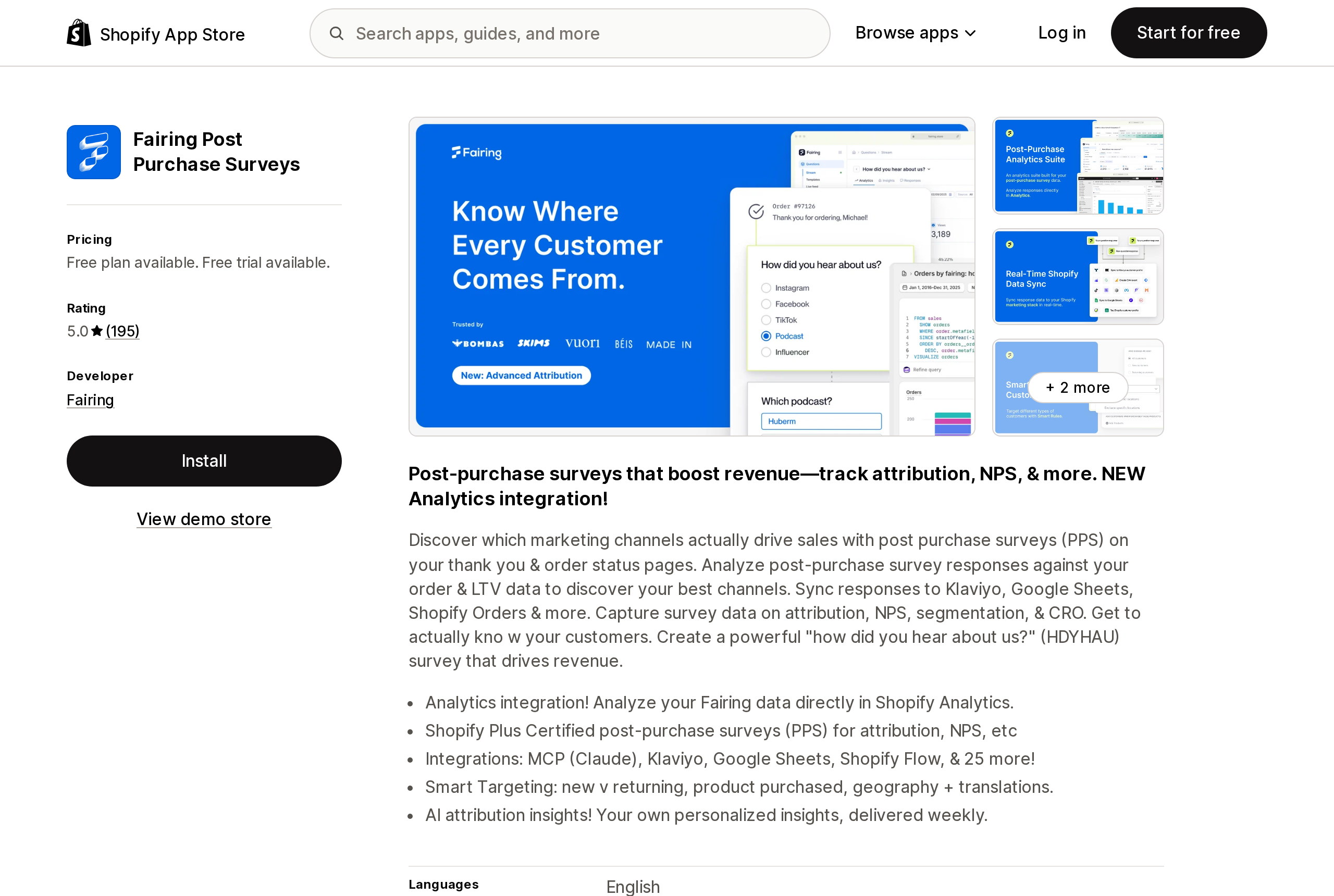
Source: Shopify App Store (Fairing Post Purchase Surveys), retrieved September 16, 2026
Fairing writes post-purchase survey responses — the "how did you hear about us?" answers — as metafields on the order object. Its own engineering note on the integration is unusually direct about the reasoning: "We made a deliberate choice not to build this reporting in-house," and "We're not building a BI tool. We're not trying to become your reporting platform."
The mechanics, from that same post: it requires the write_orders scope, setup takes about five minutes, historical data is backfilled by default with an option to skip, and the stored values are subject to Shopify's standard metafield limits. On the App Store listing the app shows a 5.0 rating across 195 reviews, a free plan up to 200 orders, then $49/month for 201–500 orders, $99/month to 1,000 and $149/month to 5,000, with a 14-day free trial on the paid tiers. Its listing does not carry a Built for Shopify badge.
Note which scope that integration asks for. Writing survey answers onto orders needs write_orders — a permission you would scrutinise. Writing a claim onto your sales chart needs write_analytics_annotations, which most merchants have never heard of.
There is a coverage gap here too. Shopify's developer docs say analyticsQueryable applies to customer, order, product and product variant metafield definitions, and that not every metafield type is eligible. The Help Center's merchant-facing page lists reports metafield support for Products, Variants, Customers, Orders, Transfers and Locations. The two lists do not match. If a specific object matters to your reporting, check it in your own admin rather than trusting either page.
What to do with this
Three things, in order.
Turn annotations on once and look at the source of every marker. They are off by default, which means most stores have never seen what is being written to their charts. The app icon and name are displayed in the annotations panel. If you see a type that has nothing to do with what that app does — a revenue_milestone from a shipping app, an attribution_change from something that is not an analytics tool — that is worth a support email to the developer.
Treat write_analytics_annotations as a real permission at install time. It is not a data-access scope, so it does not show up in the usual privacy conversation, but it lets a vendor put text with its own logo next to the numbers you make decisions from. Ask what the app writes and how often.
Do not build reporting that depends on annotations surviving. They are excluded from exports, capped at an undisclosed per-app count, deletable only by the app that made them, and invisible on any chart without a time axis. As a prompt for "what happened that week," they are useful. As a record, they are not yours.
The honest summary is that Shopify built a context layer, hit the limit of what a platform can observe about a business from the outside, and outsourced the rest to apps rather than to merchants. The merchants are the only party in that arrangement with no write access to their own chart.
Sources
- Full-stack capabilities to power app analytics — Shopify developer changelog, July 21, 2026
- Analytics — shopify.dev
analyticsAnnotationCreateandAnalyticsAnnotation— GraphQL Admin API 2026-10ANNOTATE— ShopifyQL syntax reference- Use metafield capabilities — shopify.dev
- Annotations in your Shopify reports — Shopify Help Center
- Filtering and editing your reports — Shopify Help Center
- Annotations bring store event context directly to your analytics — Shopify Changelog, May 5, 2026
- New app-added annotations on your analytics charts — Shopify Changelog, July 24, 2026
- Better Context for Your Store's Data: 5 Updates to Analytics in Shopify — Shopify blog, June 17, 2026
- Fairing Data Now Lives in Shopify Analytics — Fairing, April 2, 2026
- Fairing Post Purchase Surveys — Shopify App Store, retrieved September 16, 2026
Shopify Magic's own media generation tools cover background removal, logo generation, and hero banners — images only, per Shopify's Help Center. There is also an unrelated app literally named 'Magic: Product Photos & Videos' that charges $19.99–$49.99/month and has nothing to do with Shopify. Meanwhile, eight real AI product-video apps bill on five incompatible units: credits, videos, points, a flat $1 per video, and one-time packs with no subscription at all. Normalized to a real cost per finished video, the spread runs from about $0.04 to $1.29 — roughly 32x — and one app's $39–$99/month plans don't disclose a video quota at all. Researched September 6, 2026.