
What you will learn
On this pageContentsCloseOpen
Most comparisons of these two apps are about the editor: which canvas feels better, which has more templates, which one lags when you drag a collection onto a page. That is the part you can judge in an afternoon on either free plan.
The part you cannot judge in an afternoon is the billing unit. PageFly and GemPages do not meter the same thing, and the number that decides your monthly bill is not on either Shopify App Store listing.
The short version
PageFly's unit is the slot, and a slot is not a page. Its listing states it plainly: "01 slot is equal to 01 page/ 01 section." A reusable sticky-header section consumes the same allowance as a full landing page.
PageFly's App Store listing is missing two of its published plans. The listing shows Free, Builder at $24/month, Accelerate at $99/month and Enterprise at $299/month. PageFly's own pricing page shows Free, Builder $24, Optimize $39, Accelerate $99 and Power $199 — plus three enterprise tiers at $299, $499 and $999. The listing's own fine print refers to a plan it does not display: "$5 per 5 extra pages/sections (~$1/slot); optional, billed monthly on Builder & Optimize."
The two sources also disagree on AI credits. The listing says Accelerate includes 320 credits per month. PageFly's pricing page says 400.
Annual billing exists on one side only. PageFly sells yearly billing on Accelerate ($990/year) and Power ($1,990/year) — "Pay for 10 months, get 12." GemPages: "Annual billing is no longer available for new customers, but existing yearly subscribers can continue renewing their plans."
GemPages does not meter published pages at all. "Unlimited pages on any paid plan. The Free plan includes one published page." It meters sections instead: the $29 Build plan lists "Theme Sections: 20" and "AI Image to Layout: 300 Sections."
GemPages discounts multi-store setups, and the listing does not say so. Its help center publishes 10% off the second store, 15% the third, 20% the fourth, and 25% from the fifth onward, requested in-app.
Neither app carries the Built for Shopify badge. On the "More apps like this" cards rendered on both listings, EComposer Landing Page Builder was labeled Built for Shopify. PageFly, GemPages and Shogun were not.
The leaving terms differ more than the pricing does. PageFly requires you to unpublish pages and sections down to your new plan's slot limit when you downgrade. GemPages keeps live pages intact on the free plan but will not let you re-publish any of them if you have more than one.
All figures below were checked on September 14, 2026. App Store ratings and review counts move continuously — PageFly's review count read 5,893, 5,897 and 5,898 within a single session — so treat those as a snapshot.
What Shopify already does, before either app
Shopify's own theme editor composes pages from sections, and the ceilings are documented. The Help Center states it directly: "You can have up to 25 sections for each template, and each template can contain up to 1250 blocks across all sections."
It also states where you can do this: "Sections can be customized and added to any page of your online store, with the exception of gift card and checkout pages."
That is not a trivial allowance. A 25-section page built from your theme's own sections costs nothing, renders in your theme's markup, and survives every app you ever uninstall. If your requirement is "a long, well-structured about page" or "a campaign page assembled from the sections my theme already ships," you have the tools.
What the theme editor does not give you is a free-form canvas — arbitrary column splits, absolute positioning, elements your theme's authors never wrote a section for — and it does not give you A/B testing, heatmaps, or post-purchase upsell funnels. That is the boundary these two apps sell across.
PageFly: the slot is the unit
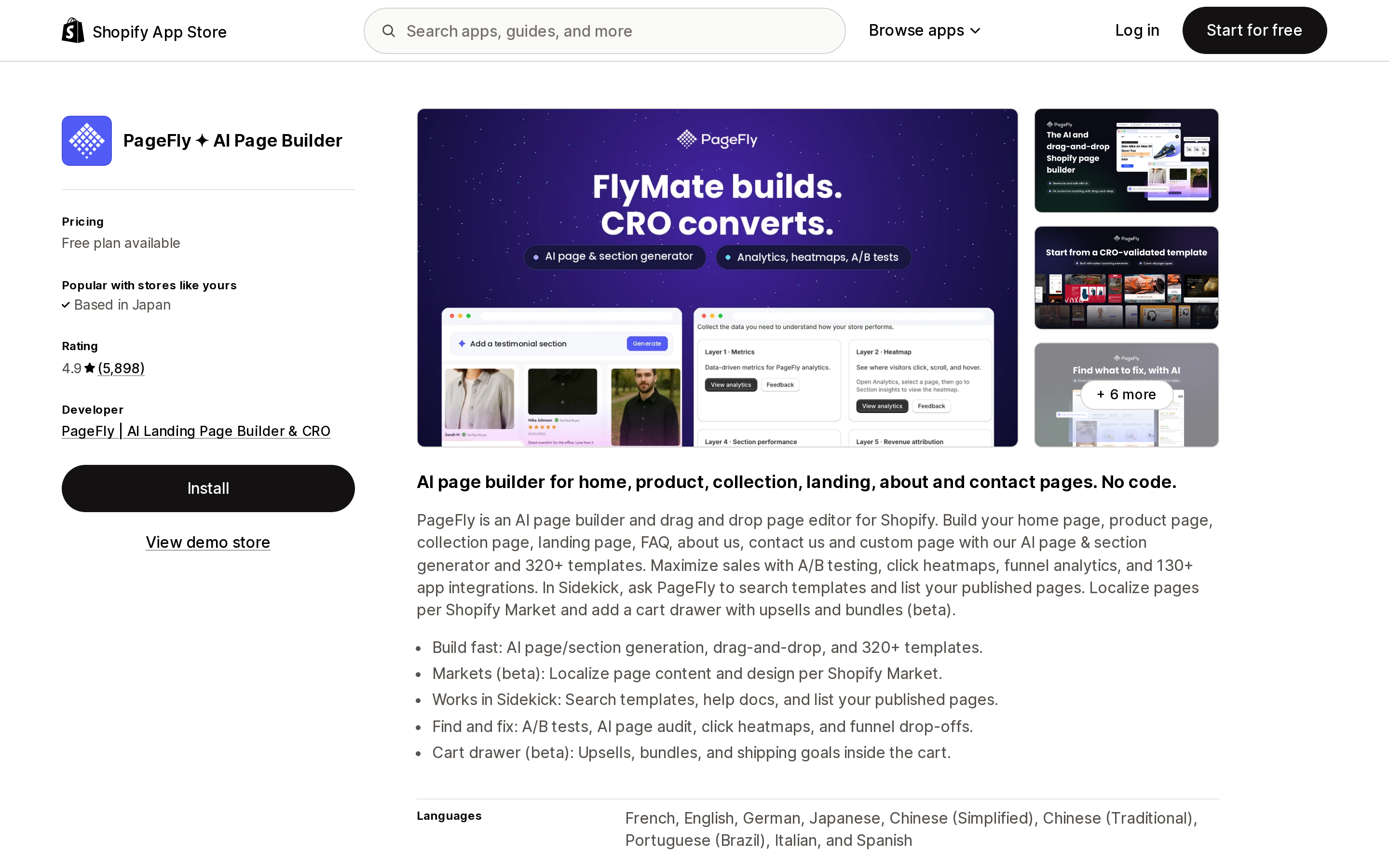
Source: Shopify App Store (PageFly ✦ AI Page Builder), retrieved September 14, 2026
PageFly ✦ AI Page Builder launched on September 28, 2017 and is published by PageFly | AI Landing Page Builder & CRO. On the App Store it sits in two categories, Page builder and Upsell and cross-sell.
Its free plan gives you one slot. Its listing defines the slot in a single line — "01 slot is equal to 01 page/ 01 section" — and that definition is the whole pricing model. Publish a landing page: one slot. Publish a reusable testimonial section you drop into five product templates: also one slot. Build a store where the app supplies a header block, a footer block, a size-guide section and three campaign pages, and you are at six slots before you have built anything a customer would call a page.
PageFly's own pricing page is where the actual ladder lives:
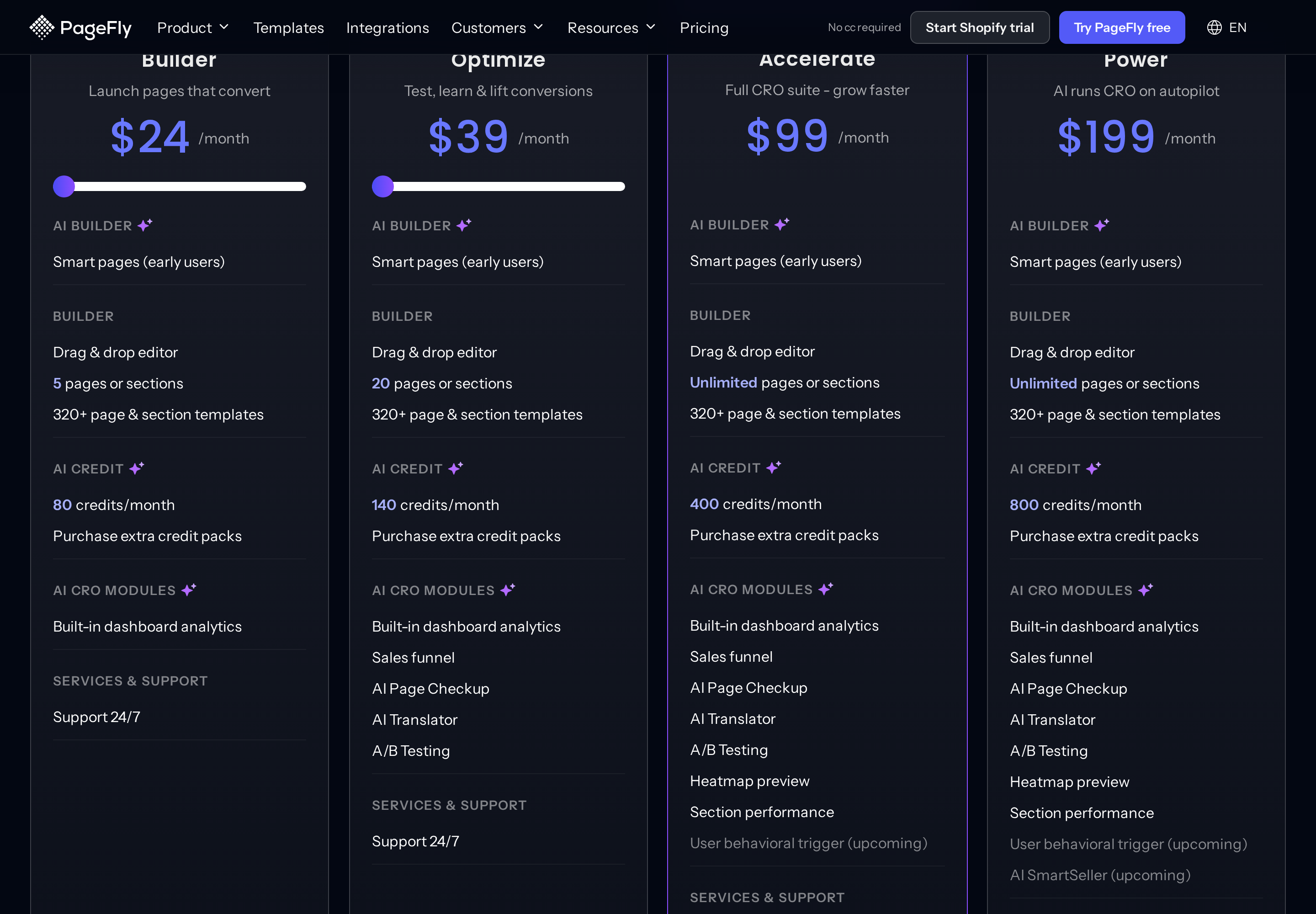
Source: PageFly pricing page, retrieved September 14, 2026
Builder and Optimize are sliders, not fixed tiers. PageFly's FAQ spells out the range: "Builder (from $24) – Launch more pages that convert. Starts at 5 slots and 80 credits; up to 15 slots and 120 credits at $34," and "Optimize (from $39) – Unlock the CRO suite: A/B testing, Sales funnel, AI Page Checkup & AI Translator. Starts at 20 slots and 140 credits; up to 75 slots and 360 credits at $94." The price and the monthly AI credit allowance move together, in $5 steps.
Two things follow from those published numbers that the widely repeated summary of PageFly's pricing gets wrong.
First, the slider reaches 75 published slots at $94/month, which is below the $99 Accelerate price. So Accelerate is not the plan you buy to get more pages. It is the plan you buy for Heatmap preview and Section performance, which the slider tiers do not include at any price.
Second, AI credits are a second meter running in parallel. PageFly's FAQ: "AI credits power PageFly's AI features — the AI Smart Page builder, AI Page Checkup, AI Translator and FlyMate. Each plan includes a monthly allowance: Free 10, Builder from 80, Optimize from 140, Accelerate 400, and Power 800." Extra credit packs are purchasable on every plan, including Free. If you build with the AI page generator rather than by dragging, the credit line is the one that will bind first.
GemPages: pages are free, sections are not
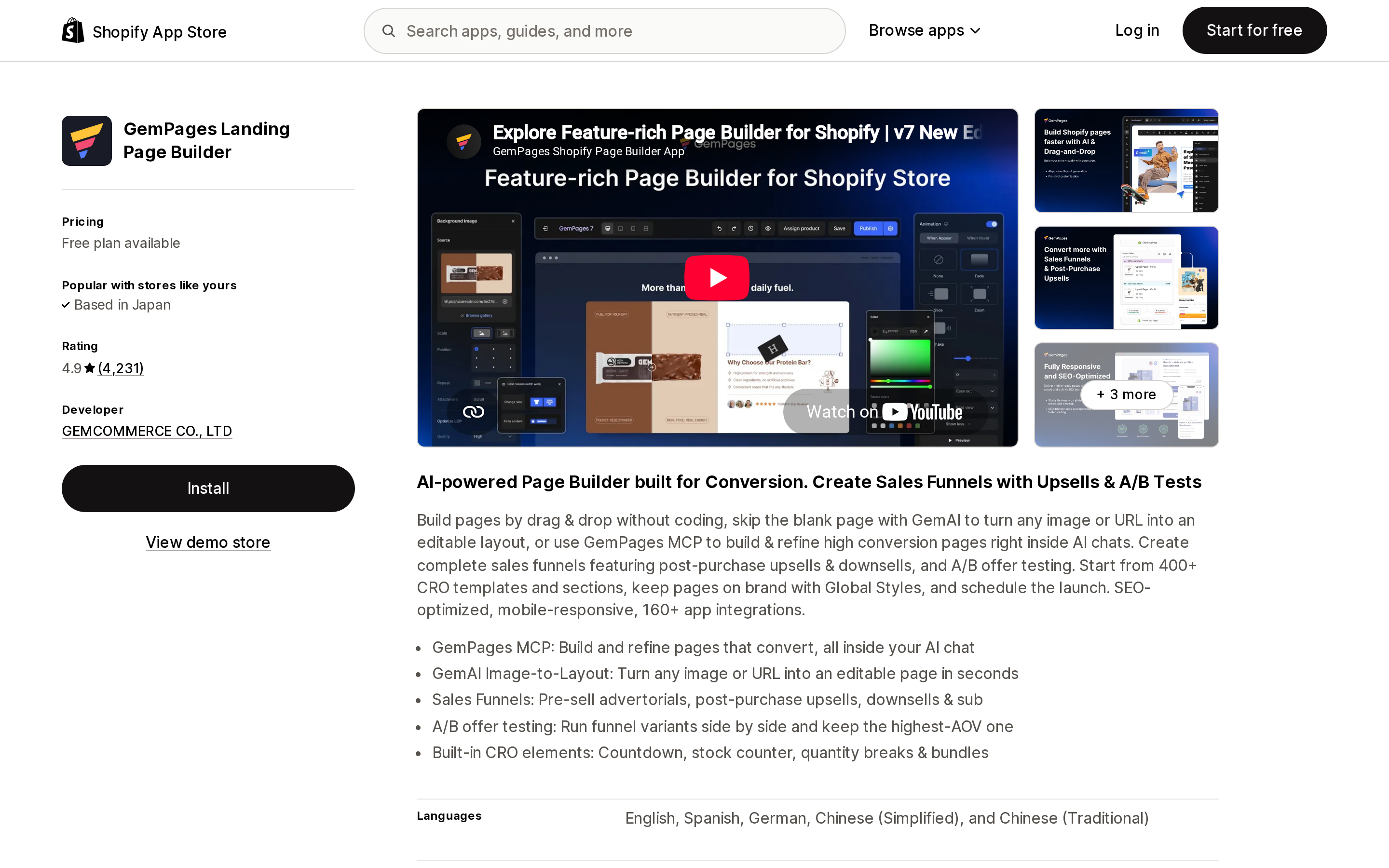
Source: Shopify App Store (GemPages Landing Page Builder), retrieved September 14, 2026
GemPages Landing Page Builder launched on March 13, 2017 and is published by GEMCOMMERCE CO., LTD. Unlike PageFly, its listing links to a public changelog.
Its plan set is the same in both places — Free, Build $29/month, Optimize $59/month, Enterprise $199/month on the listing, and the identical four in its help center. That consistency is itself worth noting after PageFly.
The published-page question has a one-line answer in the GemPages FAQ: "Unlimited pages on any paid plan. The Free plan includes one published page."
But GemPages meters too, just further down the stack. The Build plan's listing entry reads "AI Image to Layout: 300 Sections" and "Theme Sections: 20." Optimize lifts AI Image to Layout to Unlimited and adds Sales Funnels and Post-Purchase Upsell. So a store that wants twenty campaign landing pages fits comfortably inside Build at $29; a store that wants twenty-five reusable theme sections does not.
One discount structure exists only in the help center: "10% off for the 2nd store, 15% off for the 3rd store, 20% off for the 4th store, 25% off for the 5th store and onward," requested through the in-app Upgrade page. Each subscription is otherwise tied to a single store. If you run a brand family on several Shopify stores, that is a real number and the listing will never show it to you.
Where the money actually lands
Both apps bill through Shopify, in USD, every 30 days. Against published prices:
| Published pages and sections | PageFly | GemPages |
|---|---|---|
| 1 | Free | Free |
| 5 | Builder, $24 | Build, $29 |
| 10 | Builder slider, about $29 | Build, $29 |
| 20 | Optimize, $39 | Build, $29 (theme sections capped at 20) |
| 75 | Optimize slider, $94 | Build, $29 (theme sections capped at 20) |
| Unlimited | Accelerate, $99 | Build, $29 |
The crossover sits around ten. Below it PageFly is cheaper; above it GemPages is, and the gap widens fast.
That table is a slot count, not a feature match, and the features do not line up at those prices. PageFly's $39 Optimize includes A/B testing, Sales funnel, AI Page Checkup and AI Translator. GemPages puts Sales Funnels and Post-Purchase Upsell on its $59 Optimize, not on the $29 Build. So the honest comparison at the CRO end is PageFly Optimize at $39 against GemPages Optimize at $59, and at the pure page-volume end it is PageFly's slider against GemPages Build at a flat $29.
Yearly billing tilts the top of the range. PageFly's Accelerate at $990/year works out to $82.50/month; GemPages has closed annual billing to new customers entirely.
What happens when you leave
This is the difference that will cost you a weekend, and neither listing mentions it.
PageFly, on downgrade: "When downgrading, unpublish pages/sections down to the slot limit of your new plan," and down to one slot if you drop to Free. Your pages are not deleted — but the ones over the limit come off the storefront, and you choose which.
PageFly, on uninstall: the app offers two paths. Keep all data preserves pages, theme templates and assets, and PageFly warns that if Shopify pages, products or collections are using PageFly theme templates, "it's strongly recommended to keep all the data to make sure they are functional." Remove all data does what it says: "Removing all PageFly data will make any pages created with PageFly are blank / non-functional."
GemPages, on downgrade: the opposite shape. "Your live pages will stay intact, and you will still be able to edit them within GemPages. However, please note that if you have more than one published page, re-publishing any of them will not be permitted." Nothing goes dark. You simply cannot ship a change to a second page again until you pay.
GemPages, on uninstall: "After uninstalling the app and removing all codes, your pages revert to the Shopify theme. If not, your pages may stay live but can't be edited." Its uninstall article adds that removing files and scripts can cause display issues, that reinstalling restores them, and that personal data is erased 48 hours after uninstall. It also documents an import/export feature for saving page designs before you go — which is the closest thing either app has to a portable exit.
If you are choosing an app you might leave, GemPages' downgrade path keeps the storefront intact and freezes your ability to publish. PageFly's makes you take pages down. Neither is worse in the abstract; they fail in opposite directions, and only one of those directions is visible to your customers.
What each app asks to read
Both listings publish their data access, and the two requests are not close.
GemPages asks for store owner and blog contributor details, products (inventory, product listings, products, collections), discounts, Online Store pages and theme, files in the Shopify admin, and read access to locales, Shopify Markets settings and sales channel publications.
PageFly asks for all of that scope and considerably more: device and activity data (geolocation, IP address, browser and operating system, browsing behavior, client ID cookie), customer browsing behavior, all order history for the last 60 days, web pixels under store analytics, Shopify Functions (cart and checkout validations, cart transforms), metaobject definitions and metaobjects, legal policies, translations, product and variant inventory, and product tags.
There is a product reason for most of it — PageFly is also listed under Upsell and cross-sell, and it sells funnel analytics, heatmaps and revenue attribution, none of which work without order and behavior data. That is the trade, not a flaw. But if your reason for installing a page builder is "I want a nicer about page," you are granting 60 days of order history and cart-transform function access to get it, and the listing is where you can see that before you install.
Built for Shopify: neither one
Shopify's badge is awarded per app and shown in the listing header. On September 14, 2026, neither PageFly's nor GemPages' header displayed it.
The control is a listing that does. Reading the header block of EComposer Landing Page Builder in the same browser session, on the same locale, the string "Built for Shopify" sits directly under the app name. On PageFly's and GemPages' headers it is absent. Shopify's own cross-linking component agrees: the "More apps like this" cards on both listings labeled EComposer Built for Shopify, and labeled PageFly, GemPages and Shogun ‑ Landing Page Builder nothing.
Worth knowing because PageFly's own pricing page displays Built for Shopify imagery at the top. The App Store listing is the authoritative place to check a badge, and it is one click away.
How to choose
You publish fewer than about ten pages and sections, and you want pixel control: PageFly Builder at $24 is the cheaper entry, and the free plan's single slot is enough to evaluate the editor properly.
You publish more than about ten, and page count is the constraint: GemPages Build at $29 removes the meter entirely. PageFly's slider will keep climbing; GemPages' will not.
You need A/B testing on pages: PageFly names it on a specific plan — Optimize, $39 — which makes it the cheapest path you can confirm before installing. GemPages' listing tags A/B testing as a feature, but its published plan descriptions do not say which plan carries it, so ask before you buy for that reason.
You need sales funnels and post-purchase upsells: both sell it, at $39 (PageFly Optimize, listed as "Sales funnel") and $59 (GemPages Optimize, listed as "Sales Funnels & Post-Purchase Upsell"). Check what your existing upsell app already occupies before adding a second one.
You run several Shopify stores: ask GemPages for the multi-store discount before you compare monthly prices. A five-store group at 25% off changes the arithmetic, and it is not on the listing.
You want to keep the option of leaving cheaply: GemPages, for the import/export path and the downgrade behavior that leaves live pages up.
You want as few app permissions as possible: GemPages, clearly. It asks for no order history, no customer behavior data, no web pixels and no Functions access.
Your requirement is a long, structured page built from sections your theme already has: neither. Twenty-five sections per template is the documented native ceiling, and most stores never reach it.
What we could not verify
Neither vendor publishes, in a source we could check, how a published slot or a published page is counted when a page is unpublished mid-cycle, or whether draft pages count. PageFly's speed FAQ ("No. PageFly is optimized to maintain store performance") and GemPages' ("No. We optimize every line of code, use global CDNs, and only load our scripts on GemPages-built pages") are vendor statements, not measurements, and we did not test either. GemPages' A/B testing appears under its Upsell and cross-sell feature list on the App Store but is not itemized on a specific plan in its published pricing; confirm the plan requirement with its support before you buy for that reason.
Researched September 14, 2026. Slider pricing, AI credit allowances and plan names in this category change frequently, and the two apps' listings and pricing pages were not in agreement on the day they were checked. Open both before you install.
Sources
- Theme structure — Shopify Help Center
- PageFly ✦ AI Page Builder — Shopify App Store, retrieved September 14, 2026
- GemPages Landing Page Builder — Shopify App Store, retrieved September 14, 2026
- EComposer Landing Page Builder — Shopify App Store, retrieved September 14, 2026 (Built for Shopify control)
- PageFly Pricing Plans — PageFly, retrieved September 14, 2026
- Pricing Plans and FAQs — GemPages Help Center
- Uninstall GemPages — GemPages Help Center
Shopify added a Bin name column to the inventory CSV on August 25, 2025. It holds one bin per variant per location, it is created only by CSV import, and it prints on Order Printer pick lists. What it does not do is leave Shopify. Shopify staff confirmed on the developer forum in October 2025 and again in January 2026 that there is no public API access to the field, and the developer forum was still reporting the gap in June 2026. That single fact shapes the whole category: EasyScan and iPacky store bins in metafields, Bins-USA and ShelfPilot store them in their own databases, and a free app called Simple Bin Locations copies metafield bins into order notes so packing slips can show them. Shopify's own multi-bin model, with per-bin quantities and an unbinnedQuantity field, exists today only as a feature preview on development stores. Pricing, plan gates, and where each app keeps the bin data, verified on the Shopify App Store, the Shopify Help Center, shopify.dev, and the Shopify community forums on September 18, 2026.